The problem
Every industry is automating. Indian schools are still just digitizing - replacing paper with basic apps, but stuck with four structural problems: overwhelmed administrators buried in manual paperwork, disconnected communication that leaves parents out of the loop, inefficient processes for attendance, grading, and scheduling, and transport chaos - no real-time visibility into student safety during the commute.
The sharpest version of this problem sits in transport. Every existing safety tool - GPS trackers, dashcams - monitors. None of them prevent.
Positioning: automation, not digitalization
Mapping competitors (Edunex, Campus 365, and other school-management platforms) across two axes - digitalization → automation and communication → safety - showed nearly every player crowded into the same corner: digitizing records and communication, nothing more. Parentalview took the open quadrant: automated safety with prevention built in. That single positioning call shaped the hardware strategy, the pricing model, and the entire Phase 1 scope.
Why transport-first
Parentalview is a full school-automation vision, but Phase 1 is deliberately scoped to the Automated Transport Management Ecosystem. Three reasons drove that call:
- Anxiety is the buying trigger. The moment a parent waves goodbye at the bus stop is the highest-emotion touchpoint a school owns. Solve that first and a school's most vocal stakeholders become champions.
- Hardware is the moat. Ignition-based alcohol detection, fatigue monitoring, seatbelt/door alarms, ADAS voice alerts, live surveillance - software-only competitors can't follow without becoming a different company.
- Daily usage compounds. Two bus rides a day means the parent app opens twice a day, every day - building the engagement base that Phase 2's academic features later plug into.
Sequencing: Phase 1 (2025–26) - Market penetration with the transport ecosystem across Tier 1–2 cities via direct sales, education-association partnerships, and referrals → Phase 2 (2026–28) - Expand each existing account into the full school-experience ecosystem, tracked on acquisition, ARR, and retention.
What I built - Phase 1
Parentalview Phase 1 is not one app - it's an ecosystem of seven role-specific surfaces sharing one backend and one design language:
- School Web Panel - The operations console for administrators
- Super Admin Panel - Internal tooling for onboarding and managing schools
- Bus App (Android tablet, in-vehicle) - The driver's surface
- Parent's App (iOS/Android) - The parent's surface
- Guard App - Campus gate verification
- Support & Sales Panels - Internal operations
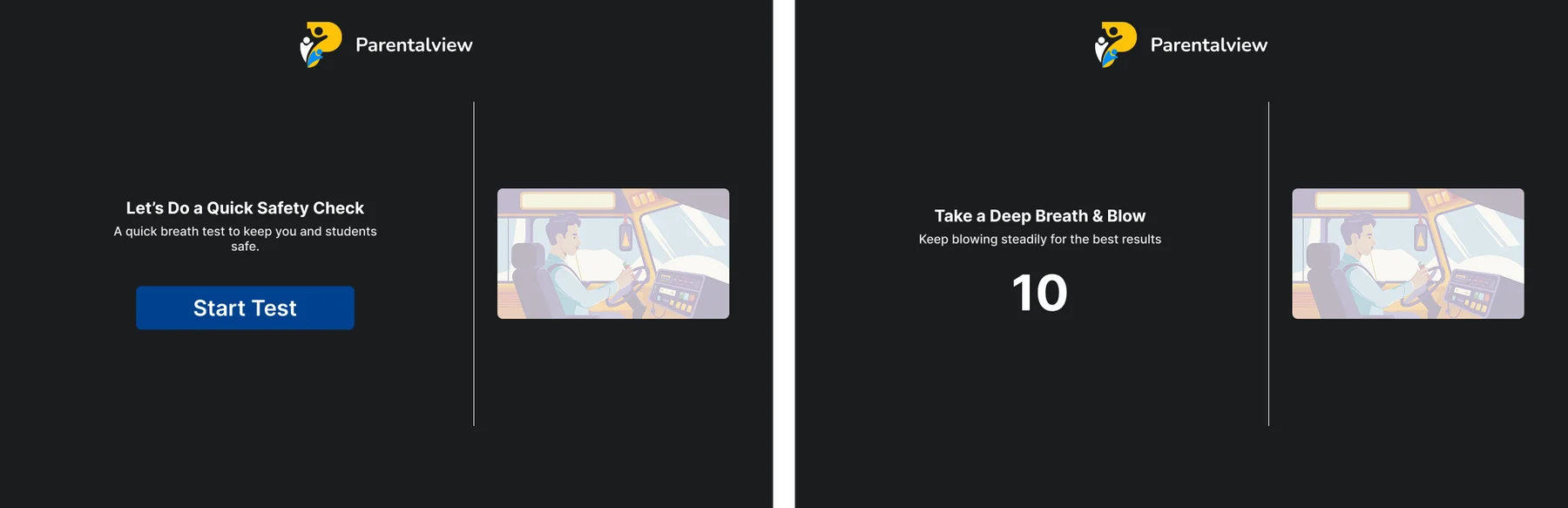
- Breathalyzer Device Interface - The hardware sobriety-check flow
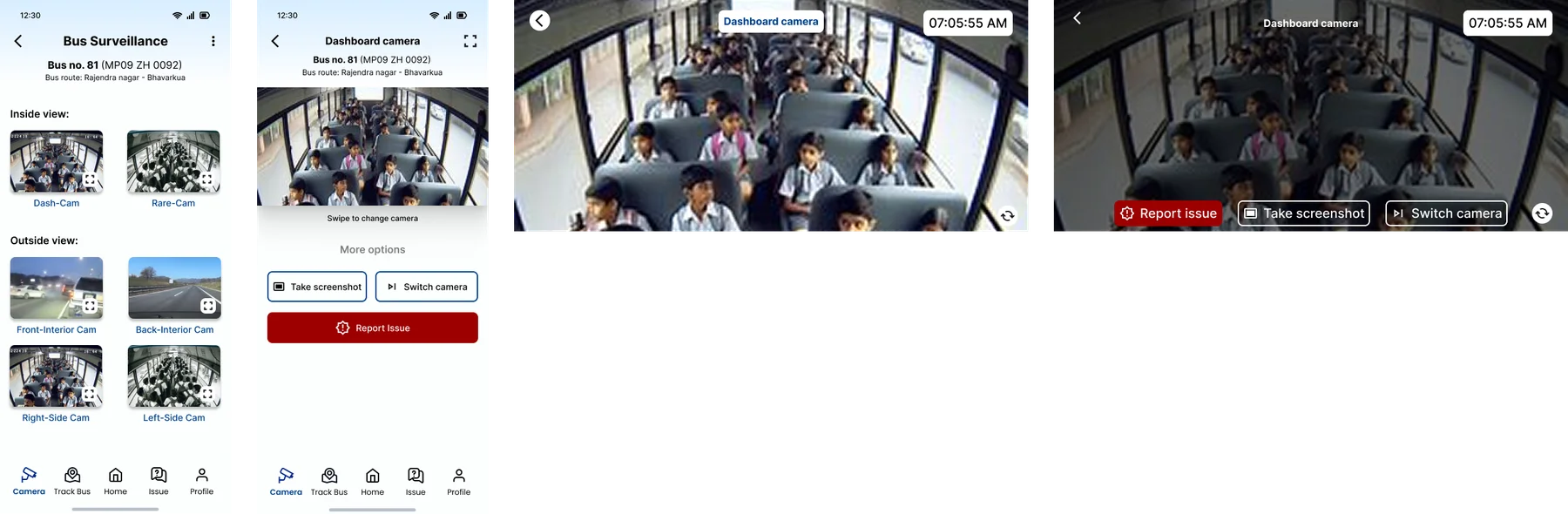
All seven were designed and structured by me, sharing identity, state colors, and notification grammar - so the ecosystem reads as one product no matter which door a user enters through. On top of that sit the core safety features: driver sobriety verification that prevents the engine from starting, secure-door and seatbelt alerts, fatigue detection, ADAS blind-spot voice alarms, live GPS tracking, automated notifications, a digital notice board, QR visitor verification, live bus surveillance - and commute-time audiobooks plus the Podwise Olympiad, a national-level awareness competition for students.
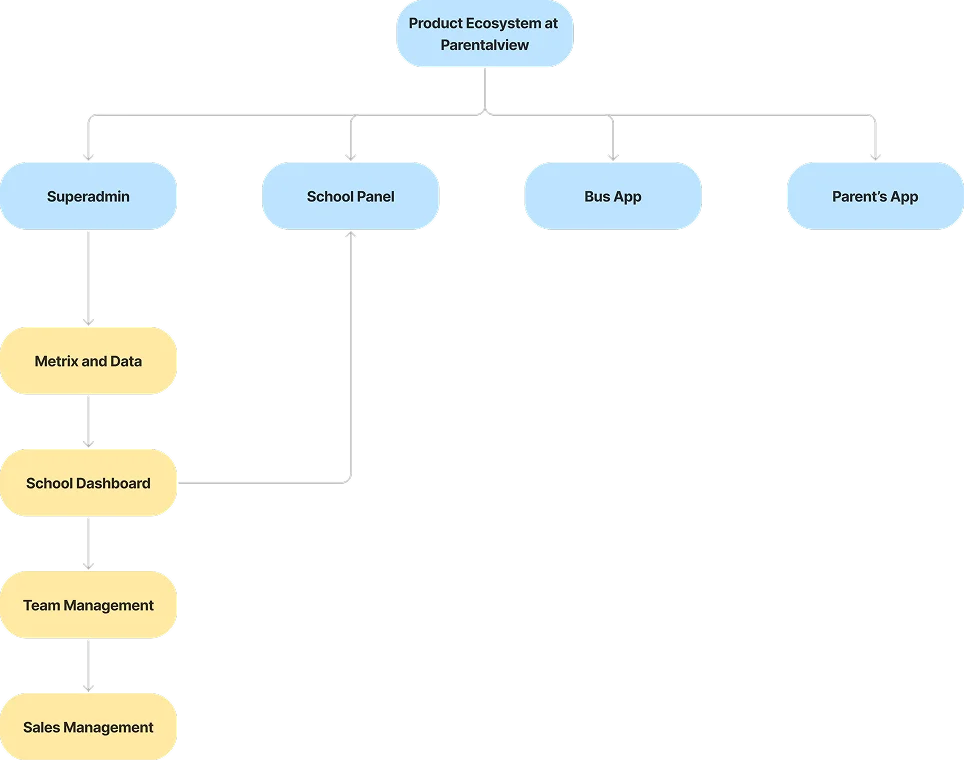
Five decisions that shaped the system
-
Prevent, don't just monitor.
If alcohol is detected, the bus simply doesn't start - and the admin gets an alarm, not just a log entry.
Trade: More hardware complexity and installation overhead, accepted because “monitoring-only” is exactly where every competitor stops.
-
Hardware bundled into a per-student subscription.
The primary plan wraps A1-grade hardware, installation, maintenance, upgrades, and replacements into one minimal monthly fee per student - removing the capex objection that stalls school procurement. A Customized AMC plan exists for schools that want to own hardware outright.
Trade: We carry hardware cost upfront, in exchange for predictable recurring revenue and a materially shorter sales cycle.
-
Role-specific apps, not one mega-app.
Seven distinct surfaces, each scoped to exactly one role's job. A driver never sees fleet analytics; a parent never sees route optimization.
Trade: Seven surfaces to design and maintain, for near-zero onboarding friction per role - the design foundation behind “seamless school onboarding” as a claimable differentiator.
-
Validate before building the OS.
500+ parent surveys and 50+ school surveys shaped Prototype 1.0; the resulting feedback shaped 2.0. The ROI numbers schools respond to - 30–35% management time saved, 55–60% less paperwork - came directly out of those conversations.
-
Commute time is product surface, not dead time.
Audiobooks and the Podwise Olympiad give students - not just parents and admins - a reason to actively like the product.
Trade: Scope beyond pure safety, taken because a product only the buyer loves is a product that churns.
Competitive moat
Business model & market
Minimal per-student monthly subscription bundling hardware + software, or a Customized AMC plan for schools that prefer to own hardware. Land via transport - the high-anxiety, high-frequency touchpoint - then expand into the full school OS in Phase 2.
The signal that became a company
One Phase 1 feature - the ignition-based alcohol detection system - pulled disproportionate inbound interest from fleet operators and institutions well beyond schools. Reading that signal, isolating the feature, and spinning it out as SafeIgnite is the strongest product decision in this case study - and it was only possible because Parentalview was structured as an ecosystem of separable capabilities, not a monolith.
Seven surfaces, one system
The hardest design problem wasn't any single screen - it was the ecosystem. The organizing principle: every surface is scoped to one role's job at one moment, while shared semantics - trip states, alert colors, student identity - stay identical everywhere.
Parent app: designed for 7:45 AM
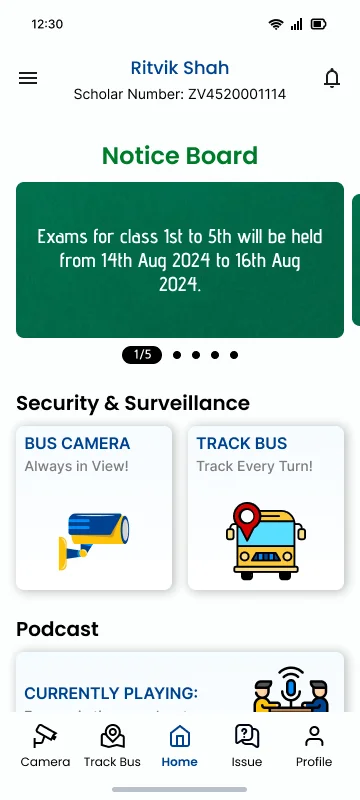
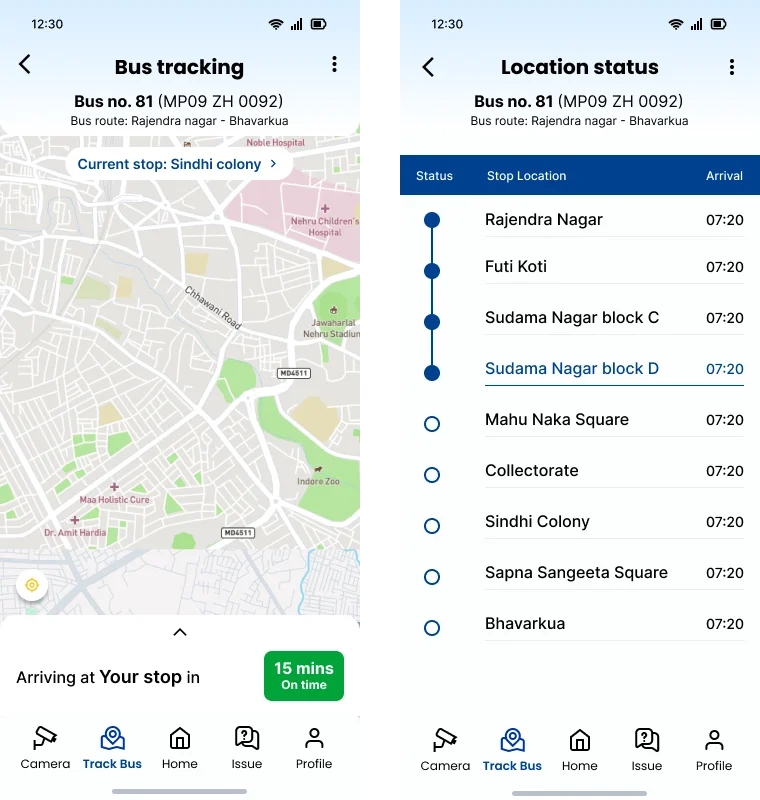
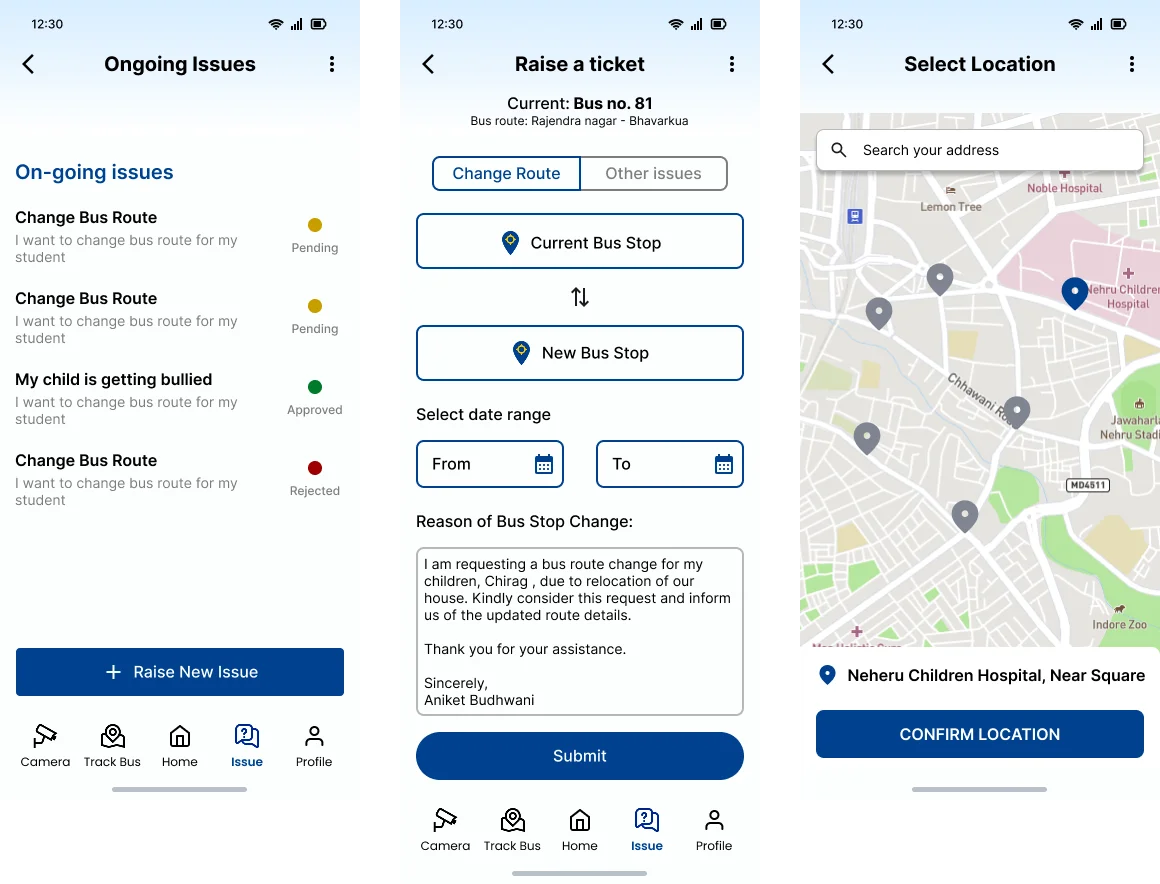
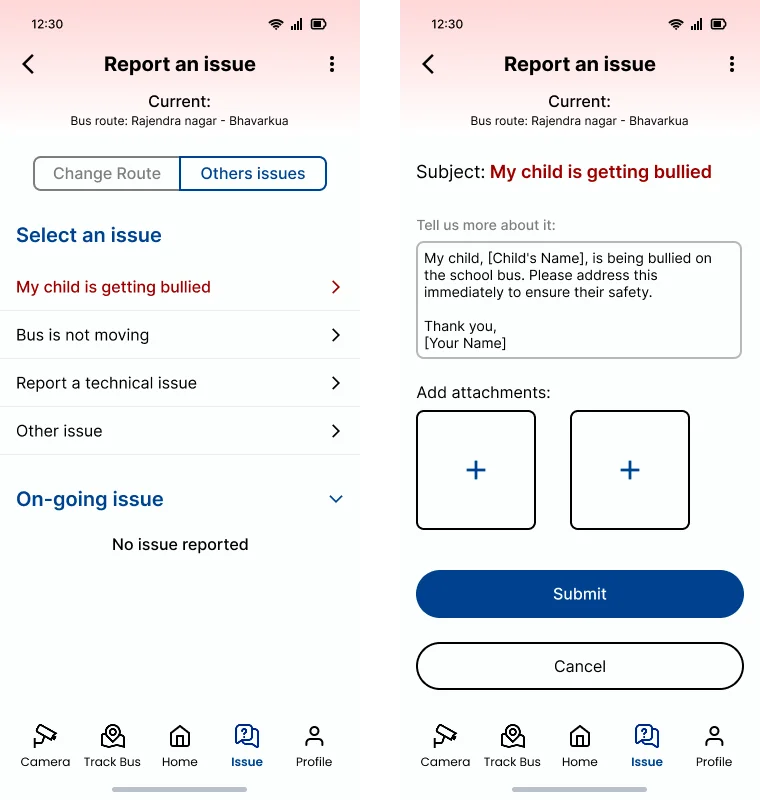
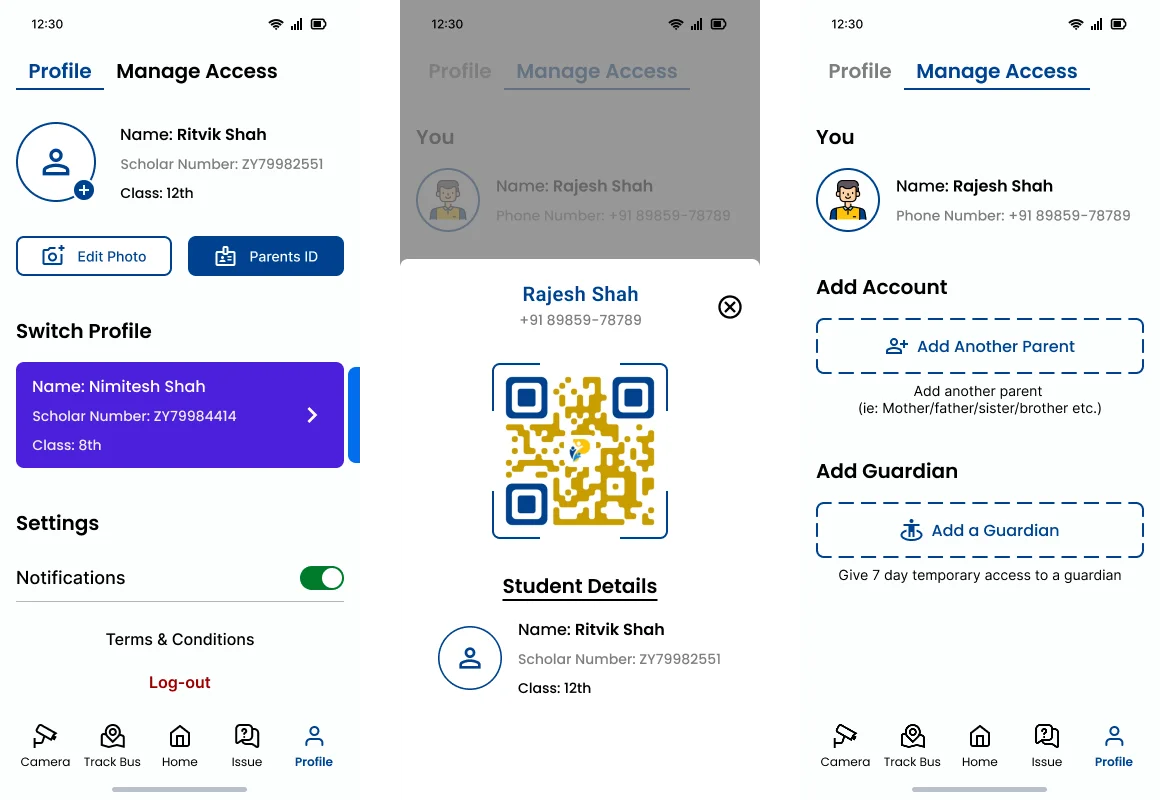
The parent's core moment is standing at a bus stop, anxious, wanting one answer: where is my child? Track Bus and Camera (live in-bus feed) sit at the top of the navigation; Report Issue and Account sit behind them. The home screen went through multiple documented iterations before landing on a layout where bus status is answerable in a single glance - no taps required.
- The automated notification layer (departed, arriving, delayed, incident) is event-driven from hardware, not typed by a transport manager - trustworthy by construction.
- Bus-stop change requests moved from phone calls into a structured in-app flow, converting the most common parent-school friction point into a tracked ticket.
Bus app: three versions to get a driver's attention right
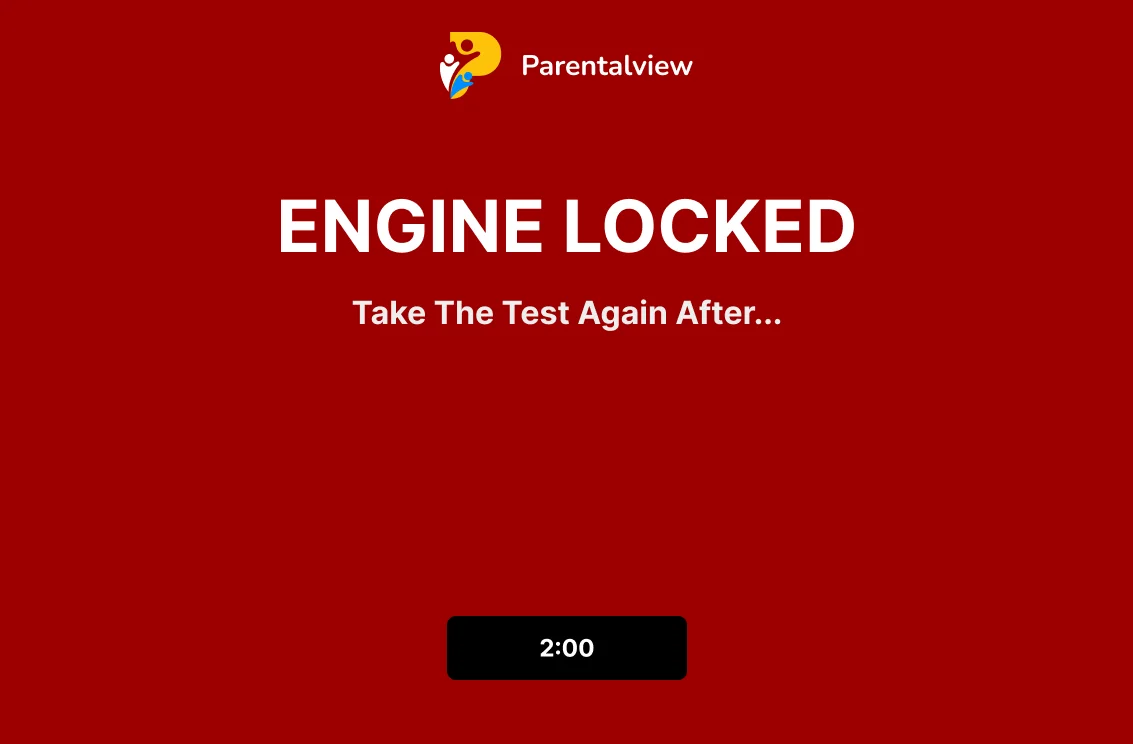
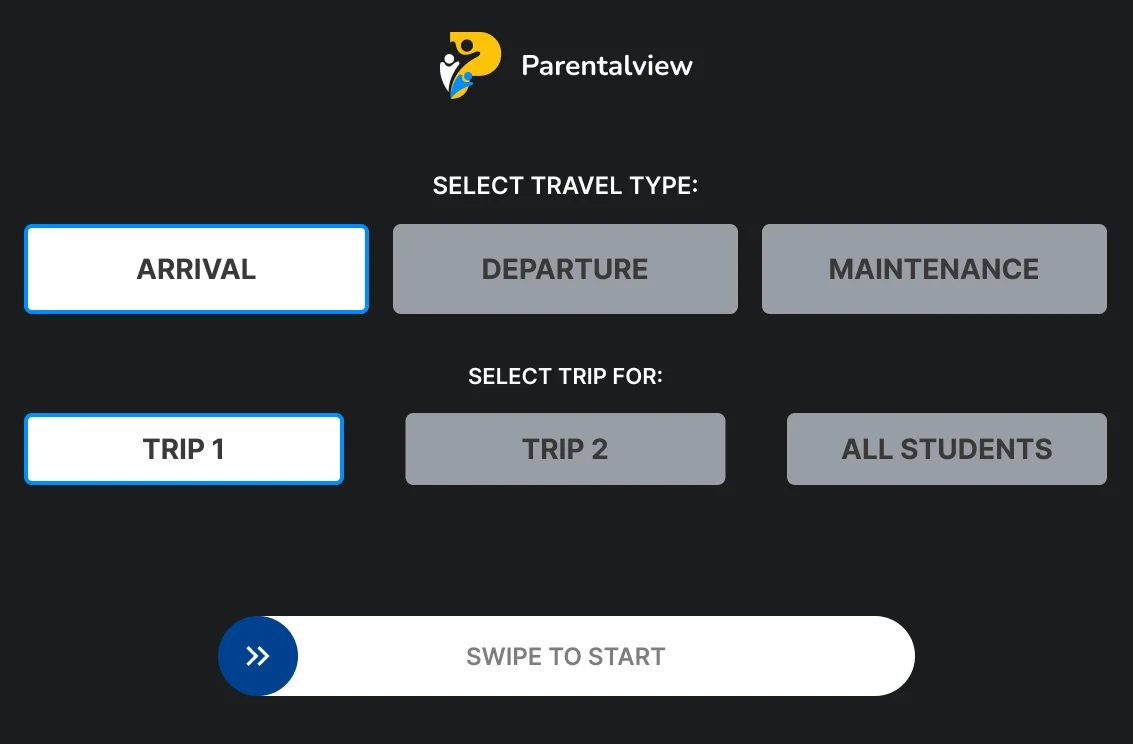
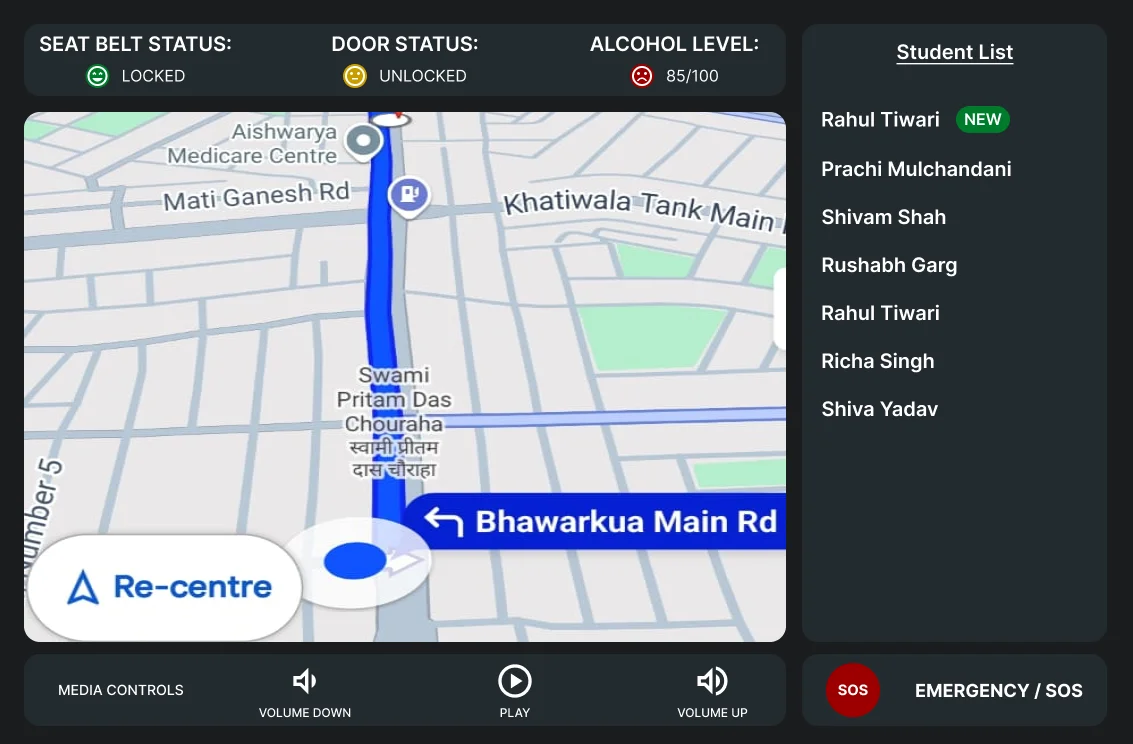
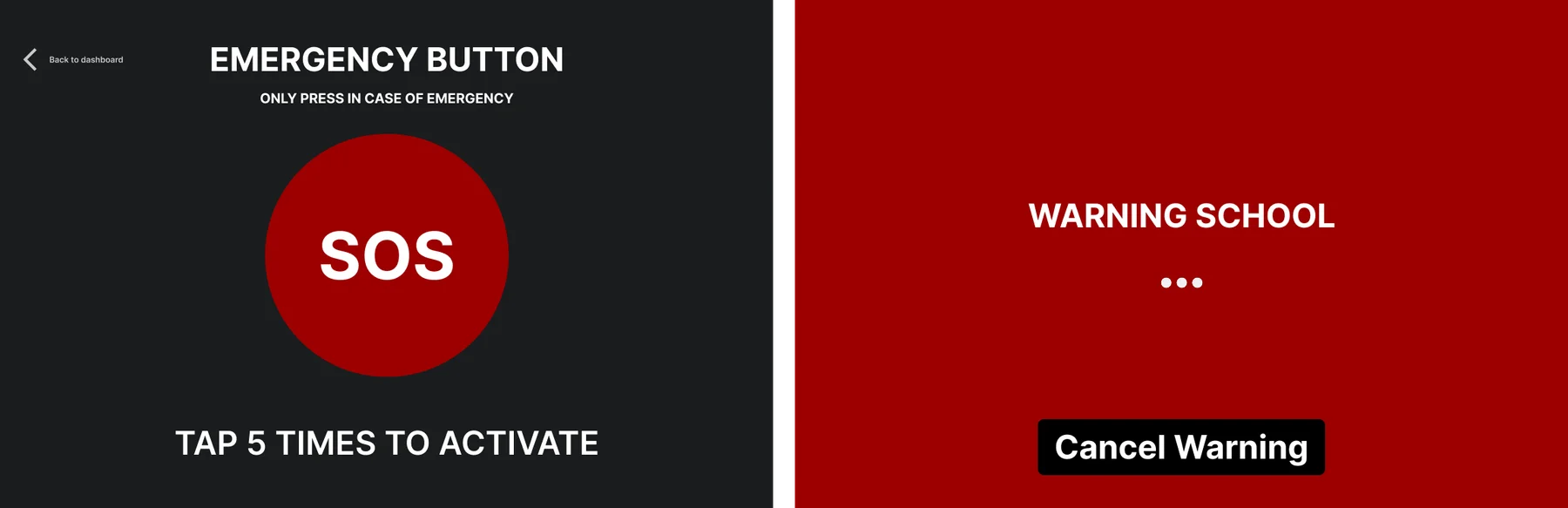
The bus app runs on a tablet in a moving vehicle, used by a driver whose eyes belong on the road. The Figma file holds three full design iterations, each stripping the interface further down to trip states (Trip Start → Active → Trip End), navigation, and one unmissable SOS flow with an explicit “Contacting” state - so a driver knows help is actually in motion.
- The alcohol test is a first-class flow, not a settings item - the trip cannot begin until the test state resolves.
- A simple end-of-trip mood check (happy / neutral / sad) gives schools a daily pulse on driver wellbeing.
School web panel: an operations console structured by primitives
The panel is organized around the seven primitives an administrator actually manages - Students, Drivers & Conductors, Routes, Locations, Buses, Tickets, School Management - each a section with list → detail → edit depth. Individual bus cards aggregate live status so the fleet view answers “is everything okay right now?” before any drill-down.
- Parent-raised tickets (issues, stop changes) land here as structured work items - closing the loop the parent app opens.
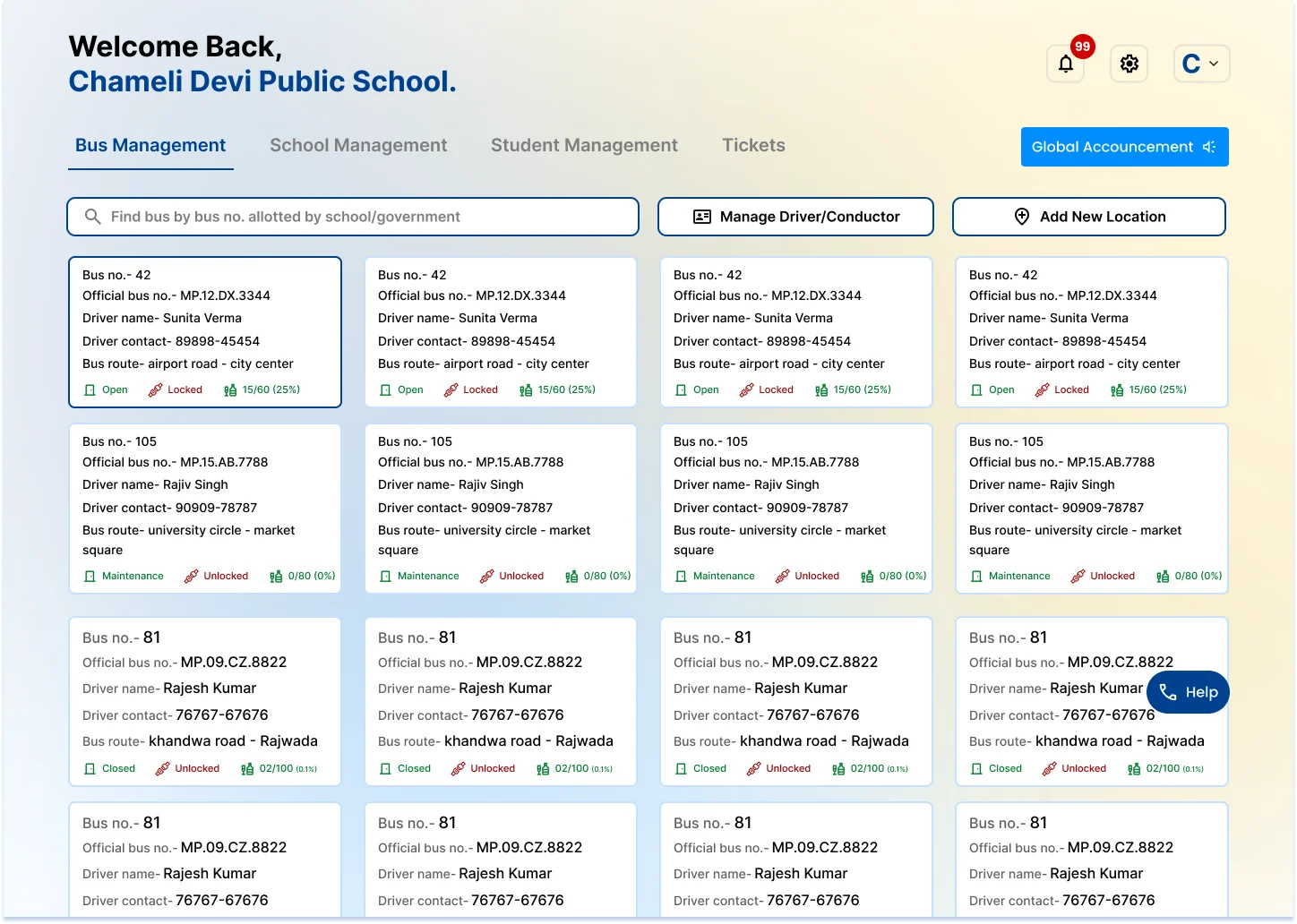
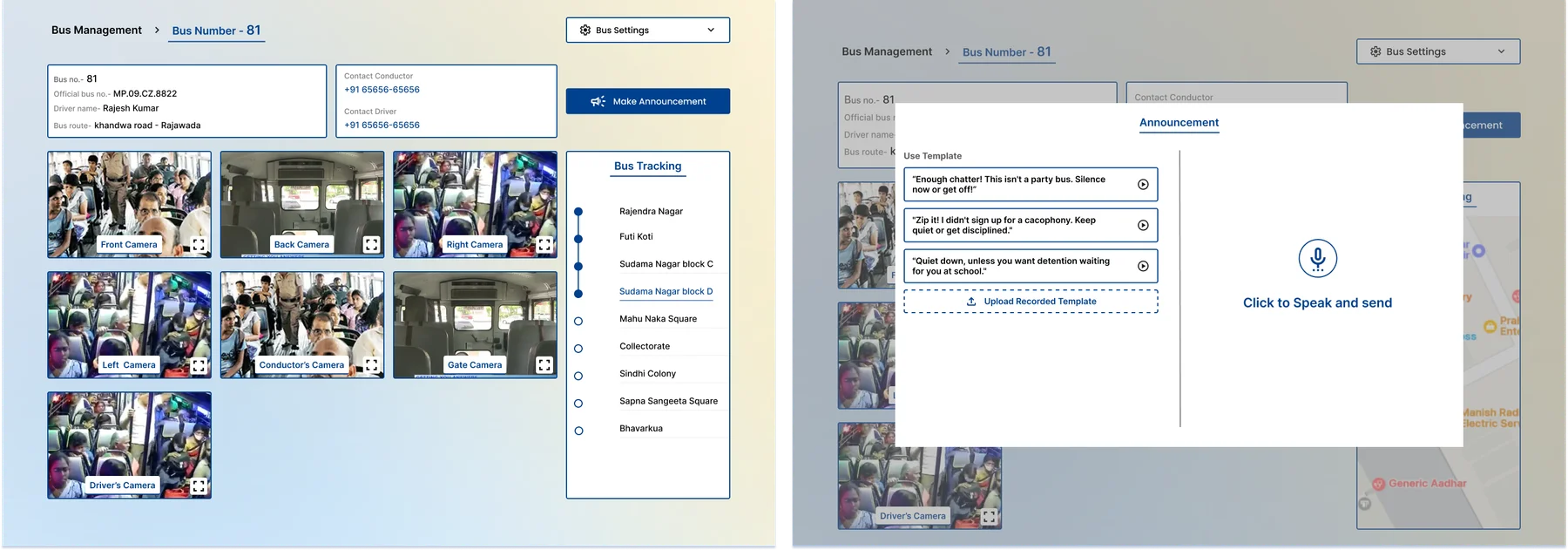
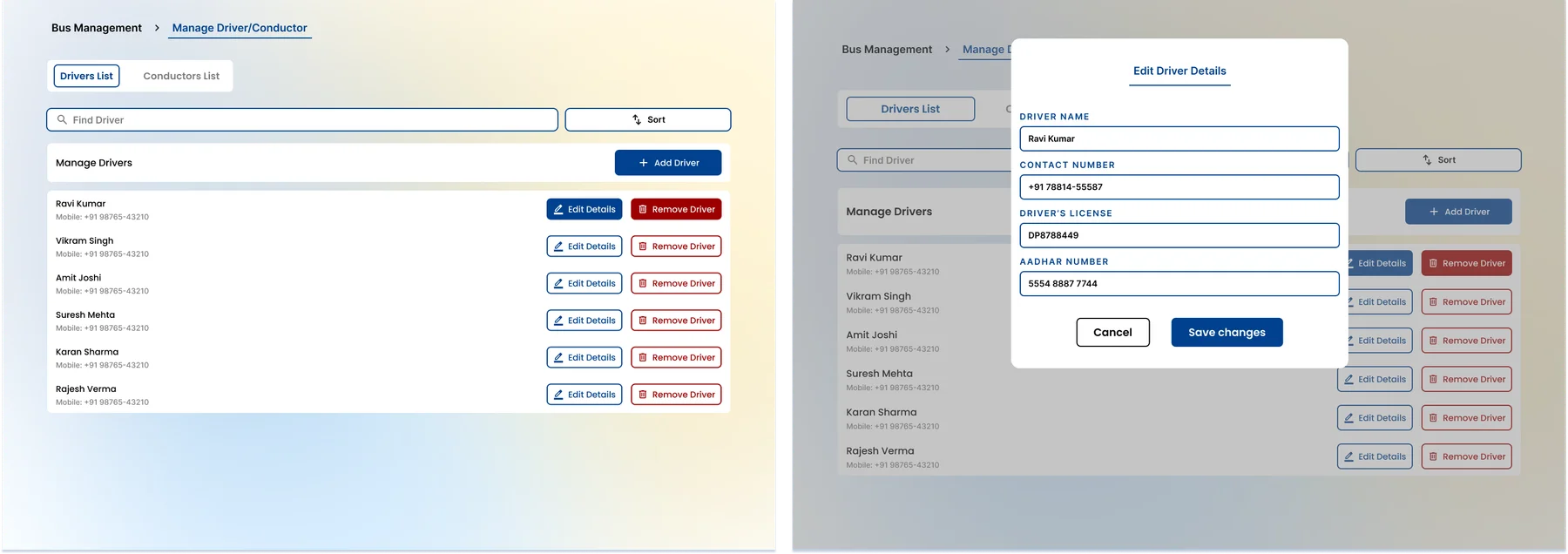
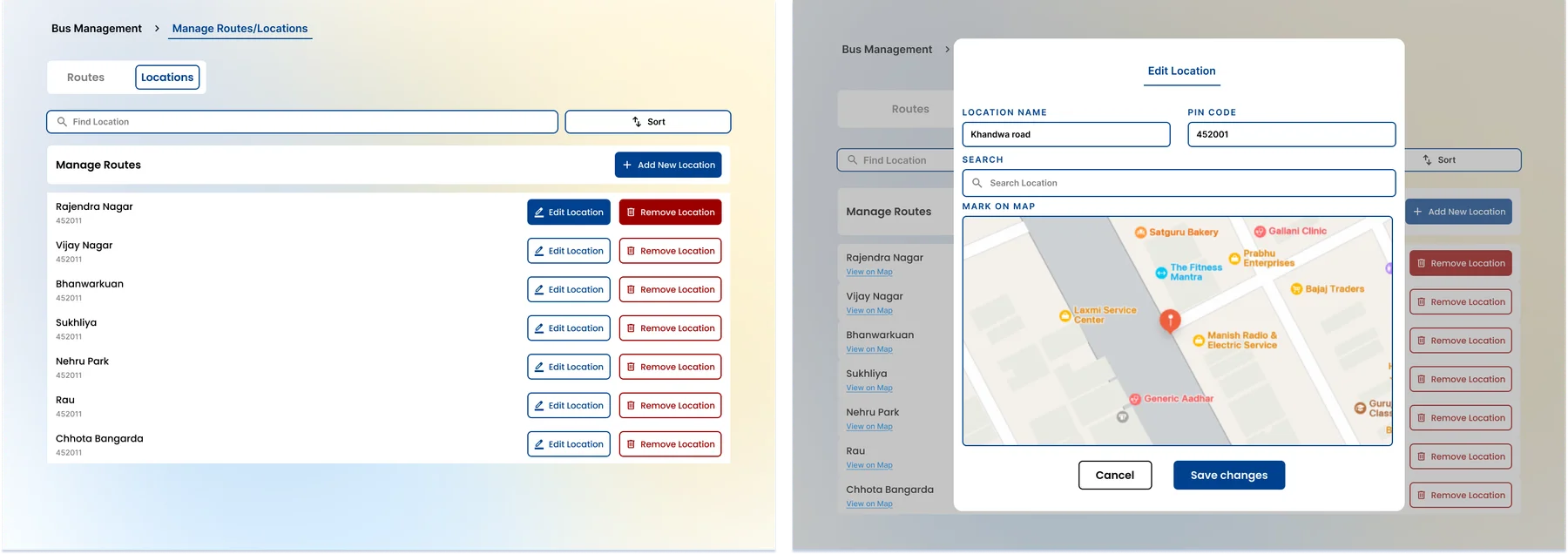
The invisible half: internal surfaces
Super admin, sales, and support panels were designed alongside the customer-facing surfaces, not after them. The super admin's add-school flow is the design artifact behind “seamless school onboarding” - onboarding is a guided sequence, not a services engagement. The guard app closes the campus perimeter with QR-based visitor verification, sharing the same identity model as the rest of the system.
Next steps - Phase 2: from transport ecosystem to school OS
-
RFID walk-in attendance & campus tracking.
Contactless attendance as students enter the gate, with parents notified of safe arrival. Campus-wide RFID tracking needs a deliberate privacy and consent posture designed before launch, not after.
-
Library management system.
RFID borrowing, digital library cards, e-reservations, reading plans, gamified challenges - reusing the student-identity and RFID infrastructure from attendance rather than building a parallel system.
-
Feedback kiosks & automated announcements.
On-campus kiosks give students a direct, secure channel to administration; QR-targeted classroom announcements replace the intercom - both extensions of existing patterns onto campus hardware.
-
Unify the design system before scope triples.
Seven surfaces currently stay consistent by discipline, not documentation. Phase 2 adds teachers and students as first-class users - the shared state colors, identity patterns, and notification grammar need formal documentation before that expansion, not during it.
-
Prove the land-and-expand motion.
The Phase 2 business case rests on upgrading Phase 1 schools in place. The first schools that adopt an academic module on top of transport will validate - or force a rethink of - the entire 2026–28 expansion plan.
What I learned
Structure for separability, not just scale. Building Parentalview as an ecosystem of distinct capabilities - rather than one tightly coupled platform - is what made it possible to spot a strong standalone signal (SafeIgnite) and spin it out cleanly, without disrupting the core product.
Anxiety is a better wedge than a feature list. Transport wasn't chosen because it was easiest to build - it was chosen because it's the single highest-emotion daily touchpoint a school owns. That emotional wedge did more for adoption than any feature comparison table could.
Internal tooling is part of the product. The super admin's onboarding flow isn't a backstage tool - it's the actual mechanism behind a claimed differentiator. Designing it with the same care as customer-facing surfaces is what makes the claim true.
A roadmap should admit what could break. Phase 2 isn't a feature list - each item names the real risk behind it: consent design for RFID tracking, scope creep threatening the parent app's calm, an unproven expansion motion. Naming the risk is what makes the roadmap credible.